

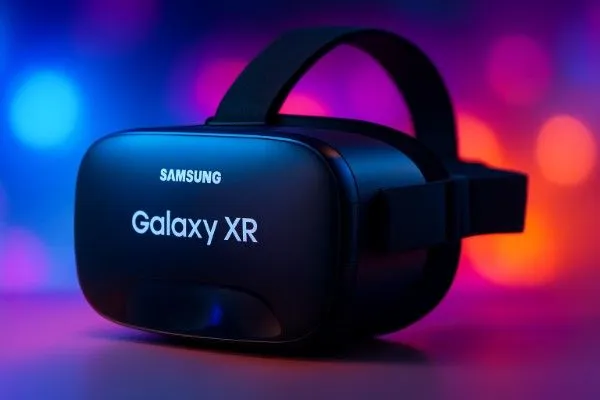
Samsung Galaxy XR Review — Living the Future, One Lens at a Time
When I first unboxed the Samsung Galaxy XR, I wasn’t expecting to feel transported. I’ve worn countless headsets before — VR, AR, MR — all promising to redefine reality. But when I slipped the Galaxy XR over my head, something felt different. It wasn’t just another futuristic gadget. It was a tangible peek into what tomorrow could actually feel like.
I’ve been covering technology for over a decade. I’ve tested the earliest Oculus units, Apple’s Vision Pro, Meta’s endless Quest iterations — and every time, I thought we were getting closer to the future. Yet, each one felt like an isolated experiment. The Galaxy XR, however, felt like an ecosystem — an experience that doesn’t demand you escape reality, but invites you to reshape it.
Design: Where Comfort Meets Confidence
Let’s start with what you feel first — the hardware.
The Galaxy XR doesn’t just sit on your head; it perches there, effortlessly. At just around 1.2 pounds, it’s lighter than the Apple Vision Pro by a noticeable margin. The difference may not sound dramatic on paper, but in practice, it’s a revelation.
Samsung’s all-plastic design was a bold move — and it paid off. Unlike metal-heavy builds that scream luxury but punish your neck after an hour, the Galaxy XR is weight-balanced, ergonomic, and surprisingly sleek. The forehead cushion is its unsung hero. It cradles your face like soft memory foam and keeps the pressure away from your nose and cheeks. The headset rests evenly between forehead and skull, never digging or pinching.
If the Vision Pro is a helmet, the Galaxy XR is a pair of futuristic ski goggles. You’re aware you’re wearing something, yes — but it doesn’t imprison your head. It gives you breathing space, both physically and psychologically.
And that breathing space changes everything.
When I wore the Vision Pro, I often felt sealed off — isolated in a bubble of pristine pixels. The Galaxy XR, by contrast, keeps you connected. You can see the real world through gaps at the edges — to your left, right, and bottom. It’s like gently pulling down a pair of oversized sunglasses that blend seamlessly with your surroundings.
This open design philosophy is where Samsung beats Apple at its own game. Augmented reality isn’t about escaping; it’s about blending. The Galaxy XR understands that perfectly.
A Real World in Focus
With this headset, I didn’t feel cut off. I could glance at my phone, check notifications, sip coffee, or even type on my laptop without removing it. I could see my Bluetooth keyboard directly, making it easier to keep working. That simple freedom — to stay in your world while peeking into another — is the future AR has always promised.
For moments when I wanted full immersion, Samsung included magnetic light shields that snap onto the bottom edges. Within seconds, I could go from half-dreaming in mixed reality to being fully submerged in cinematic immersion.
Watching a Netflix show in the XR feels surreal — a personal cinema hovering inches from your eyes. Yet, even then, I preferred leaving the shields off. There’s something magical about knowing your coffee cup is right there on the table while dragons breathe fire in your periphery.
Display and Camera: Beautiful, but Not Perfect
Each eye gets a 4K panel (3,552 x 3,840), the same resolution as Vision Pro. Text is crisp, videos are rich, and virtual objects pop like holograms from a sci-fi film. But as good as it looks, it’s not flawless.
The passthrough cameras still struggle with real-world fidelity. Colors appear muted — as if your reality has been run through a desaturation filter. The brightness and contrast are decent but not lifelike. Samsung’s camera passthrough isn’t yet the “see-through” dream we’ve been chasing, but it’s closer than most.
Controls: A Learning Curve with Potential
Physical controls are smartly placed. On top, there’s a volume rocker and a multi-function button. Single press brings up the launcher, double press opens the camera, triple press starts eye calibration, and a long press launches Google Gemini, Samsung’s new AI assistant.
Holding volume down + main button captures a screenshot — a neat trick for content creators.
There’s also a trackpad on the right temple for re-centering or switching modes. It’s tactile, yes, but I rarely used it. Samsung’s attempt at mimicking Apple’s “Digital Crown” falls short. The physical dial of Vision Pro is simply more intuitive.
However, hand-tracking is where the XR shines. Gesture controls feel natural — pinch, grab, swipe — everything just works. After years of clunky, laggy hand detection, this finally feels like something you can rely on.
Fit and Function: Almost Perfect
One design choice baffles me: the adjustment knob at the back. It’s effective but awkward. When I lean back against a wall or high chair, it digs into my skull. Long viewing sessions — the kind where you’d watch a full movie — become uncomfortable fast.
It’s not a dealbreaker, but it’s a design trade-off that limits comfort for certain positions.
The built-in fan is another mixed bag. It keeps the headset cool, but you’ll occasionally hear a soft hum when no audio plays. It’s faint but noticeable. Once the music starts, though, it fades into the background.
Sound quality? Solid. The spatial audio delivers a wide soundstage, though not as deep as Apple’s. Moving app windows and hearing sound reposition in 3D space is oddly delightful — like directing an invisible orchestra with your fingertips.
Battery and Practical Use
I used Galaxy XR plugged in most of the time. My desk, couch, and bed are littered with USB-C cables, and that’s fine. The external battery pack is gray, dense, and entirely serviceable. But here’s the truth: you’ll want it plugged in for anything longer than a few hours.
It’s not yet the kind of device you wear on the go. It’s a stationary portal, not a mobile companion — at least for now.
Software: Android Grows Up in 3D
And then there’s Android XR — the operating system that powers this beast.
If you’ve ever used Android tablets or Samsung phones, you’ll feel at home instantly. The One UI flavor remains, just floating in space. Icons hover like glowing tiles. The interface is clear, logical, and familiar — maybe too familiar at times.
You can multitask with ease. Windows float like tabs in the air. The “pill” above each app lets you resize, hide, or close it. Up to 10 apps can live on your launcher grid, and switching between them feels as natural as flipping between browser tabs.
Google Gemini lives at the heart of the experience. Long-press the side button and your AI assistant materializes, ready to help you navigate, search, or summarize what’s on-screen. The voice recognition is fast, and its contextual awareness — understanding what you’re looking at — is quietly brilliant.
But Android XR isn’t perfect. The system still shows traces of a tablet OS awkwardly translated into 3D space. Some apps feel like floating rectangles instead of truly spatial experiences.
Samsung needs tighter integration with Google’s XR team to unify the interface. Still, compared to Apple’s overly walled-off visionOS, Android XR feels open, flexible, and — dare I say — human.
Apps and Productivity: The Future of Work, Sort Of
Most Android apps run in their tablet layout by default, which is fine but uninspired. Resize an app and it smoothly transforms to its phone version. That alone makes multitasking a joy.
I wrote most of this review using Google Keep and a Bluetooth keyboard inside Galaxy XR. The experience felt like working in an infinite office. My notes floated above my desk, browser tabs hovered beside me, and a YouTube window played quietly in the corner. It’s productivity without boundaries — once you adapt.
Yet, typing on virtual keyboards is still agony. Samsung should bundle a compact Bluetooth keyboard + trackpad combo with every purchase. Text input through voice dictation works decently, but it’s no substitute for tactile typing.
The browser — currently a tablet version of Chrome — needs an upgrade. A desktop-class browser is essential if Samsung truly wants XR to replace laptops.
Apps like YouTube, Google TV, and Photos are XR-optimized, offering spatial layouts and floating controls. Watching a 3D video in YouTube is immersive and natural, though not yet “mind-blowing.”
AI and Interaction: Gemini in 3D
Samsung’s partnership with Google is where the XR finds its soul. Gemini Live, the AI assistant, works through gestures and gaze detection. Look at something, pinch your fingers, and Gemini knows you’re referring to that element.
However, its usefulness is still limited. Gemini can navigate apps, perform searches, and summarize content — but not yet control everything hands-free. The voice interface feels too smartphone-like, when it should be spatial-first.
Give it a few iterations, and Gemini could become the connective tissue that makes XR truly indispensable.
Entertainment and Immersion
Watching media in Galaxy XR is where it shines brightest. I watched an hour of The House of Dynamite on Netflix and the World Series on YouTube TV. The picture quality is sharp, motion is smooth, and the sense of scale is addictive.
Unlike Vision Pro, which feels like being sealed inside a private theater, Galaxy XR lets the real world bleed in — and that’s a good thing. The hybrid immersion feels natural, less lonely.
For gamers, latency is low, though it’s no replacement for PC-tethered systems yet. Still, Samsung’s approach hints at the next step: casual, controller-free spatial gaming.
Practical Reality: Can It Replace a Laptop?
Not yet — but it’s close.
For light work — writing, research, web browsing — Galaxy XR handles it effortlessly. But when you need real multitasking, deep editing tools, or multiple monitors, a laptop remains essential.
Still, the potential is undeniable. With infinite floating screens, zero clutter, and AI-powered assistance, XR computing could soon rival traditional setups.
The Verdict: A Vision You Can Touch
After a week with the Galaxy XR, one question lingered in my mind: Would I buy this?
The answer is yes — but not for everyone.
This isn’t a mass-market product yet. It’s an enthusiast’s dream, a developer’s playground, a creator’s lab. But it’s also the clearest window into the future we’ve ever had.
Samsung has achieved something remarkable: it made XR feel natural, not novel. It’s not a toy or a status symbol. It’s a tool — one that, for the first time, feels like it belongs in everyday life.
The Galaxy XR is proof that the future of computing isn’t in your pocket — it’s all around you.
Final Thoughts
For years, we’ve been told that mixed reality would change everything. With Samsung Galaxy XR, that prophecy finally feels within reach.
The headset’s comfort, openness, and Android-based ecosystem make it the most approachable step yet toward a world where reality and technology truly coexist.
It’s not perfect. It’s not cheap. But it’s here — and it’s real.
And for those of us who’ve been waiting since that first Google “One Day” video, the Galaxy XR is the closest we’ve come to that dream becoming reality.

I just wanted to drop by and say how much I appreciate your blog. Your writing style is both engaging and informative, making it a pleasure to read. Looking forward to your future posts!
Fantastic site Lots of helpful information here I am sending it to some friends ans additionally sharing in delicious And of course thanks for your effort
Somebody essentially lend a hand to make significantly posts I might state That is the very first time I frequented your web page and up to now I surprised with the research you made to create this particular put up amazing Excellent job